
Data cable management is essential for maintaining an organized, efficient & safe environment in network installation, office space & data center. Even though in todays digital world, wifi communication is on trend but the core still need a physical cables to keep us connected to each other.
Here are some standard and best practices for data cable management.
1. Types of cable & labeling. Use the standard cabling (CAT6, CAT6a, CAT7, fiber optics). Label both ends of the cables with clear identification (port number, location).

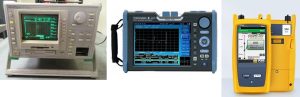
2. Cable Pathways. Use cable managers like raceways, cable rings or conduit to route cables. Cable ties for bundling in color coded. Remember to first run cables horizontally to the rack and to vertical direction. Follow the appropriate bending radius as per cable manufacturers specification. Remember the bend radius is the amount of bending that can occur before a cable may sustain damage or increased attenuation & limit bandwidth performance. Attenuation refers to loss or reduction in signal strength due to excessive bending both in analog & digital signal. It is measured by dB decibels using OTDR optical time domain reflectometer.
3. Separation of cables. Separate power & data cables to avoid EMI Electromagnetic interference. The disturbance may degrade the performance of the circuit or even stop it from functioning such case in data, can increase error rate to a total loss of data. Maintain a distance 1 foot between power & data cables when routing them. 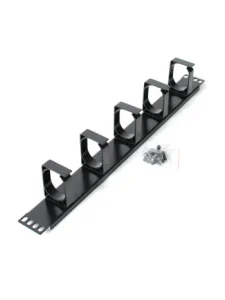
4. Cable length management. Avoid excessive cable lengths that can degrade signal. Use the required length of cable to reduce clutter. Remove any unused cables from under the raised floor or within your cabinets. This will impede airflow and will cause inefficient cooling. Deploy and monitor temperature sensors to ensure equipment and cables are being cooled.
5. Support. Do not over tighten cable ties to avoid damaging the cable. Use Velcro strap to secure cables and flexibility. In a data center setup, cable pathways are suspended from the ceiling so moving server racks or installing new rack will prevent from restructuring the cable.
6. Cable Routing. It involves planning & documenting how to run, organize and secure cables which connects devices & components. Route cables away from moving parts & heat resources. Ensure that pathways for cables are accessible for maintenance. Use patch panels to help large amounts of cables organized. It can be mounted within racks and include blank ports on one side and termination point.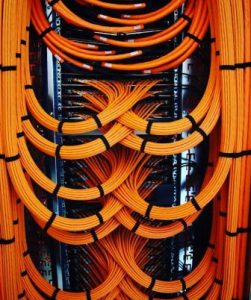
7. Documentation & Environmental Consideration. Create and maintain documentation including diagrams of cable runs & labeling scheme. Regularly update documentation to reflect any changes in the infrastructure & scalability on the increasing number of devices installed. Additionally, business growth will be obtainable without the risk of slowing down due to lagging network when structured correctly it will optimize performance.
8. Compliance & Standards. Regularly inspect cables for any signs of wear & damaged. Adhere to industry standards such as TIA-EIA 568 for commercial building telecommunications cabling standards. The ANSI/TIA 942 telecommunication infrastructure standard for data centers specifies the minimum requirements for data centers and covers all physical infrastructure including but not limited to site location, architectural, electrical, mechanical, fire safety, telecommunication, security requirements. ISO/IEC 11801 Information technology- generic cabling for customer premises. It specifies generic cabling within and to the computer room premises, or data center spaces within other types of buildings, a balanced cabling and optic fiber cabling.