
In this blog we will show you how to create a free business email address using your own domain that will make your business look trustworthy and professional than gmail, yahoo mail or hotmail. Having a branded email address builds trust and a professional email address is important when you are trying to win new clients.
If you’re ready let’s start.
First Step : visit google.com
2nd Step : Click on sign-in button
3rd Step : Once on sign in form shows, click on Create Account
4th Step : Page account shows. For you to use your work email choose “ use your current email address instead”. Fill in your name, password and work email address, then click next button.

5th Step : Email verification is required. Check for the code that google sent to your work email address. Once you get the code , enter and click verify.

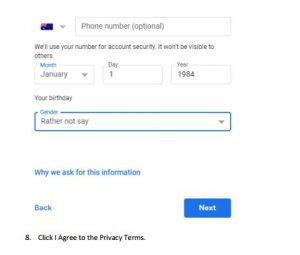
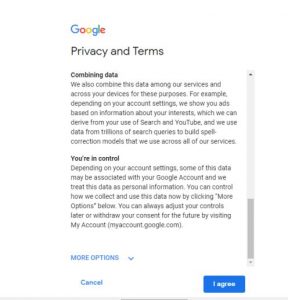
Last step : For the completion of the requirements, you need to fill up the Privacy Form. Once done, you are ready to use it.
Hoping you find my article useful.
I am always thought about this, regards for posting.
It’s very easy to find out any matter on net as compared to textbooks, as
I found this piece of writing at this website.
I constantly spent my half an hour to read this webpage’s posts everyday along
with a mug of coffee.
I savour, cause I found exactly what I used to be looking
for. You’ve ended my four day lengthy hunt! God Bless you man. Have a great day.
Bye
whoah this weblog is wonderful i love studying your articles.
Keep up the good work! You know, a lot of people are looking
round for this info, you could aid them greatly.
I don’t even know how I ended up here, but I thought this post was good.
I do not know who you are but certainly you’re going to
a famous blogger if you aren’t already 😉 Cheers!
Its like you read my mind! You appear to know a lot about this, like you wrote the book in it or
something. I think that you can do with some pics to drive the message home a little bit,
but other than that, this is fantastic blog. A fantastic read.
I’ll certainly be back.